
DayZ Hub · Mods
Terminalv1.0.0
Szerverlicenc
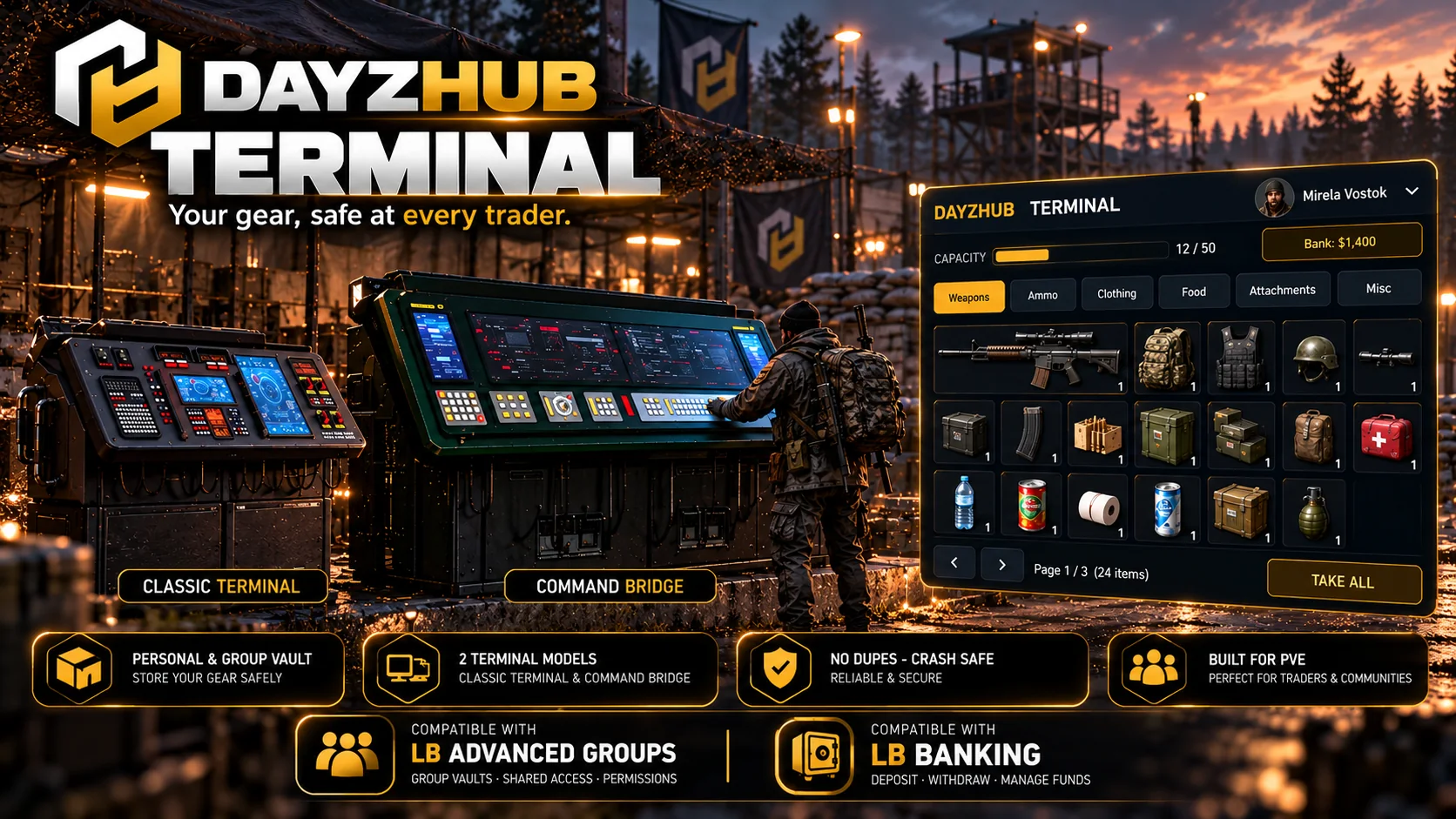
A personal and group storage terminal for PVE servers. Walk up, press F, store your gear, take it back at any terminal on the map.
Hamarosan
€45 egyszeri díj, szerver-IP-nként
További szerver-IP: €13.50
Tesztelés alatt, még nem jelent meg
Paid mod · Not on sale yet. Follow the DayzHUB Discord for the release.
Áttekintés
DayzHUB Terminal is a personal and group storage terminal for DayZ 1.30, made for PVE servers. Server owners place terminals at traders or safe zones. Players walk up, press F and store their gear in their own vault, then take it back at any terminal on the map. Players never carry or build terminals: no raiding, no base storage, no loot to manage.
Funkciók
Players
- One vault per player, plus a group vault shared by the LB Advanced Groups group.
- A clean DayzHUB HUD: your inventory on the left, your vault on the right, category tabs (Weapons, Ammo, Clothing, Food, Attachments, Misc), search, sort, pages and tooltips with condition, quantity and attached parts.
- Store Selected, Store All, Store Backpack Contents (with a confirmation), Take Selected and Take All. Shift-click or drag single items.
- Weapons keep their attachments. Items keep condition, quantity, liquids, food stage and temperature.
- Vault levels: more slots per level, with paid upgrades through LB Enhanced Banking (prices and slots are set by the server owner).
- Translated into 9 languages.
Server owners
- Place terminals in game from the DayzHUB admin bar: live preview, rotate with the mouse wheel, click to place. Move, go to and remove from the same page. Or edit Terminal.json.
- Three terminal models: the Classic terminal, the Command Console (a single desk) and the Command Bridge (a double desk, a large sci-fi console bank). You pick which one per spot.
- An admin bar page with settings, vault levels and prices, a blacklist (by class or base class), terminals, a quarantine with restore, and a read-only look at any player's saved vault.
- DayzHUB Console integration: status, quarantine list, vault inspect, events and terminal markers on the live map.
- Full logs per player and group, a security log and daily backups of every vault.
- The settings file is written once and never overwritten by an update.
Követelmények és kompatibilitás
- DayZ 1.30 stable.
- Requires DayzHUB Core.
- One licence per server.
- The personal vault works on its own. The group vault needs LB Advanced Groups and paid upgrades need LB Enhanced Banking.
Telepítés
- Először telepítsd a DayzHUB Core-t (ingyenes bármelyik DayzHUB moddal, külön letöltés a My mods oldalon).
- Másold a(z) @DayzHUB_Vault (kliens és szerver) és a(z) @DayzHUB_VaultServer (csak szerver, soha ne add a játékosoknak) mappát a szervermappádba.
- Másold a keys\DayzHUB.bikey fájlt a(z) @DayzHUB_Vault mappából a szervered keys mappájába.
- Indítási paraméterek: -mod=...;@DayzHUB_Core;@DayzHUB_Vault és -servermod=@DayzHUB_VaultServer
- Licenc: a dayzhub.net My mods oldalán add meg a szervered IP-jét, töltsd le a licencfájlt, és tedd a <profiles>\DayzHUB\Licenses\ mappába.
- Adminok: add hozzá a Steam64 azonosítódat a <profiles>\DayzHUB\Admin\admins.json fájlhoz (a Core az első indításkor létrehozza).
Konfiguráció
- Terminal.json and the admin bar page: vault levels (slots and price per level), the item blacklist, reach distance and how long logs and backups are kept.
- Place, move, go to and remove terminals in game from the admin bar, or list them in Terminal.json.
- The settings file is written once and never overwritten by an update.
Támogatás
Kérdésed vagy problémád van? Kérdezz a DayzHUB Discordon.
Szerverlicenc
Egy licenc modonként és szerver-IP-nként, bármely porton. Generáld a My mods oldalon, és tedd a fájlt a szerveren a $profile:DayzHUB\Licenses\ mappába. Ha a licenc nem érvényes, a mod leállítja a szervert, és a mod nevét megnevező üzenetet mutat (az elutasítást előbb egyszer megismétli 60 másodperc után). A Ticket csak a saját funkcióját szünetelteti. Ha a weboldalunk nem érhető el, a már megerősített szerverek legfeljebb 12 óráig futnak tovább.