DayZ Hub · Mods
DayzHUB Authenticationv1.0.0
Licencia de servidor
Players join your Discord and link their Steam account before they can play, and your game server enforces it.
★ Escribe la primera reseña →Included with your bot plan
Free with any paid DayzHUB bot plan (Plan 1 or higher; not available during the free bot trial), for your Discord server and unlimited game servers. Log in with the Discord account that owns your server to download it.
Log in with Discord
Resumen
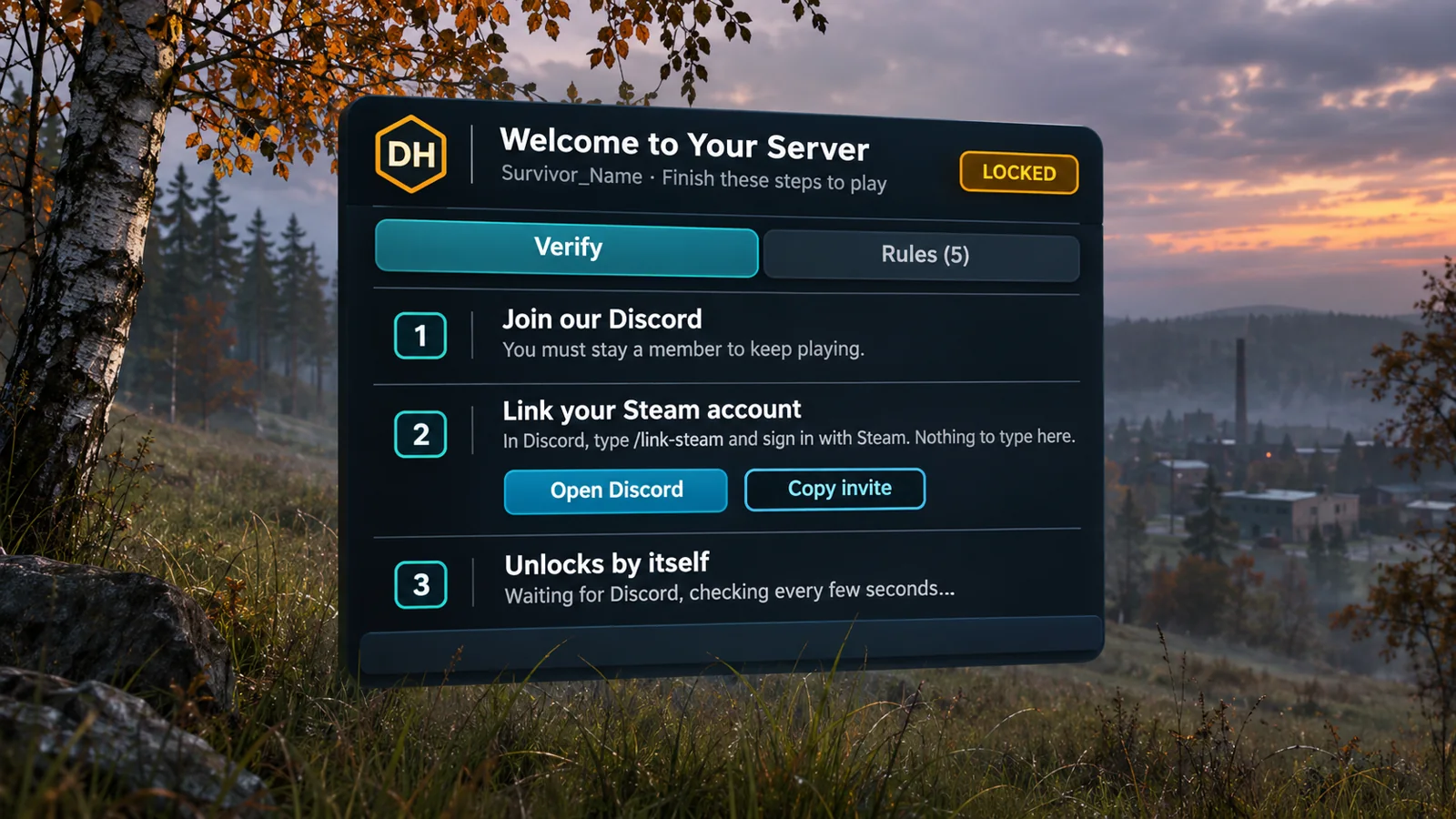
DayzHUB Authentication holds a new player until he has finished the steps you chose: accept your server rules, join your Discord and link his Steam account. Until then he is locked: he cannot move, shoot, use items or open his inventory, and he cannot hurt anyone or be hurt. The game server enforces it, so removing the mod on the client does not help. A menu opens by itself with the steps, and the player is unlocked the moment Discord confirms him.
Funciona con otros mods
Qué necesita este mod, con qué se ha probado y qué hace cuando otro mod cumple la misma función.
Necesita
- DayzHUB Core 1.0.8 or newer. Free with any DayzHUB mod. Download the current build from My mods.
- DayzHUB bot on your Discord server with a paid plan (Plan 1 or higher). Players link Steam with its /link-steam command.
- DayZ 1.30 The current build is made for it.
Funciona con
- DayzHUB Console Full control of Authentication from the Console, with locked, unlocked and kicked events in the log.
Funciones
Players
- A menu opens by itself with the steps: accept the server rules, join the Discord, link Steam with /link-steam (nothing is typed in the game).
- The player is unlocked by himself the moment Discord confirms him.
- Verified players are remembered (72 hours by default), so they are not held at every join.
Server owners
- Write your own rules in game with the rules editor (up to 30). Players accept them once, and again when you change them.
- A join delay so new players can look around first, an optional kick with a countdown, a staff bypass, a bypass list, and Let in and Kick for a held player.
- Already have a verified role from your own earlier verification? Pick it on the dashboard: a player is verified when he is linked and holds that role. Everybody links Steam once.
- If Discord or dayzhub.net cannot be reached, nobody is locked out.
- An admin bar page with Status, Settings, Rules and Players, and full control from the DayzHUB Console, with locked, unlocked and kicked events in the log.
- Nine languages plus Thai.
Requisitos y compatibilidad
- DayZ 1.30 stable.
- Requires DayzHUB Core 1.0.8 or newer.
- Included with any paid DayzHUB bot plan (Plan 1 or higher; not during the free bot trial): one Discord server and unlimited game servers, nothing to buy. Log in at dayzhub.net with the Discord account that owns your server, then download it from My mods. If your plan has ended when the game server starts, the server stops after a clear message; if it ends while the server runs, only this mod pauses. If dayzhub.net cannot be reached, your server never stops.
- Client mod @DayzHUB_Authentication and server mod @DayzHUB_AuthenticationServer (server only, never give it to players).
Instalación
- Instala primero DayzHUB Core (gratis con cualquier mod de DayzHUB, descarga aparte en My mods).
- Copia @DayzHUB_Authentication (cliente y servidor) y @DayzHUB_AuthenticationServer (solo servidor, nunca a los jugadores) en la carpeta de tu servidor.
- Copia keys\DayzHUB.bikey de @DayzHUB_Authentication en la carpeta keys de tu servidor.
- Parámetros de inicio: -mod=...;@DayzHUB_Core;@DayzHUB_Authentication y -servermod=@DayzHUB_AuthenticationServer
- Licencia: en My mods de dayzhub.net añade la IP y el puerto de juego de tu servidor. No hay nada que descargar ni poner en el servidor.
- Admins: añade tu Steam64 id a <profiles>\DayzHUB\Admin\admins.json (Core crea el archivo en el primer inicio).
Configuración
- On dayzhub.net, open your server in the dashboard and choose Game Authentication: turn it on, create the server key (shown once), pick an existing verified role if you have one, and add your Discord invite link.
- Put the server key on one line in server_key.txt on every game server.
- In game, the admin bar page has Status, Settings, Rules and Players. Settings holds the join delay, the kick countdown and how long a verified player is remembered.
- The Players section shows who is waiting right now and the recent events, and lets you let a player in, kick him, or keep a Steam ID on a bypass list.
Soporte
¿Dudas o un problema? Pregunta en el Discord de DayzHUB.
Guía de usuario (PDF)
Licencia de servidor
Una licencia por mod y por servidor (IP pública y puerto de juego, IP:PORT). Añade el servidor en My mods: no hay ningún archivo de licencia que descargar ni instalar. Cada servidor adicional cuesta un tercio del precio. Puedes conseguir primero una versión de prueba de 7 días (30 % del precio) y mejorar más tarde pagando solo el resto. Un servidor de prueba gratuito (registrado con su nombre exacto, con contraseña y hasta 10 slots) no cuenta. Si la licencia no es válida, el mod se pausa solo y tu servidor sigue funcionando; el registro del servidor muestra un enlace para añadir el servidor. Si no se puede acceder a nuestra web, los servidores ya confirmados siguen funcionando hasta 12 horas.
📣 Registro de actualizaciones
Update2026-11-10
- Players are held on join until they accept your server rules and are verified through the DayzHUB Discord bot (member of your Discord, Steam linked once with /link-steam, optional verify role).
- The menu opens by itself with four steps and unlocks by itself the moment Discord confirms the player.
- A held player cannot move, shoot, use items, open the inventory, take damage or hurt anyone. The server enforces it.
- Server rules written in game with the rules editor (add, edit, move, remove; players accept again when the rules change).
- Join delay: new players can look around for a few seconds before the menu opens (0-600 seconds, default 0).
- Optional kick with a countdown in the menu (default off, 10 minutes).
- Verified players are remembered (default 72 hours) so they are not held at every join.
- Bypass list and staff bypass.
- If Discord or the site cannot be reached, nobody is locked out.
- Admin bar page: Status, Settings, Rules and Players. DayzHUB Console actions, events and webhooks.
- 9 languages plus Thai.