DayZ Hub · Mods
DayzHUB Authenticationv1.0.0
Licenza server
Players join your Discord and link their Steam account before they can play, and your game server enforces it.
★ Scrivi la prima recensione →Included with your bot plan
Free with any paid DayzHUB bot plan (Plan 1 or higher; not available during the free bot trial), for your Discord server and unlimited game servers. Log in with the Discord account that owns your server to download it.
Log in with Discord
Panoramica
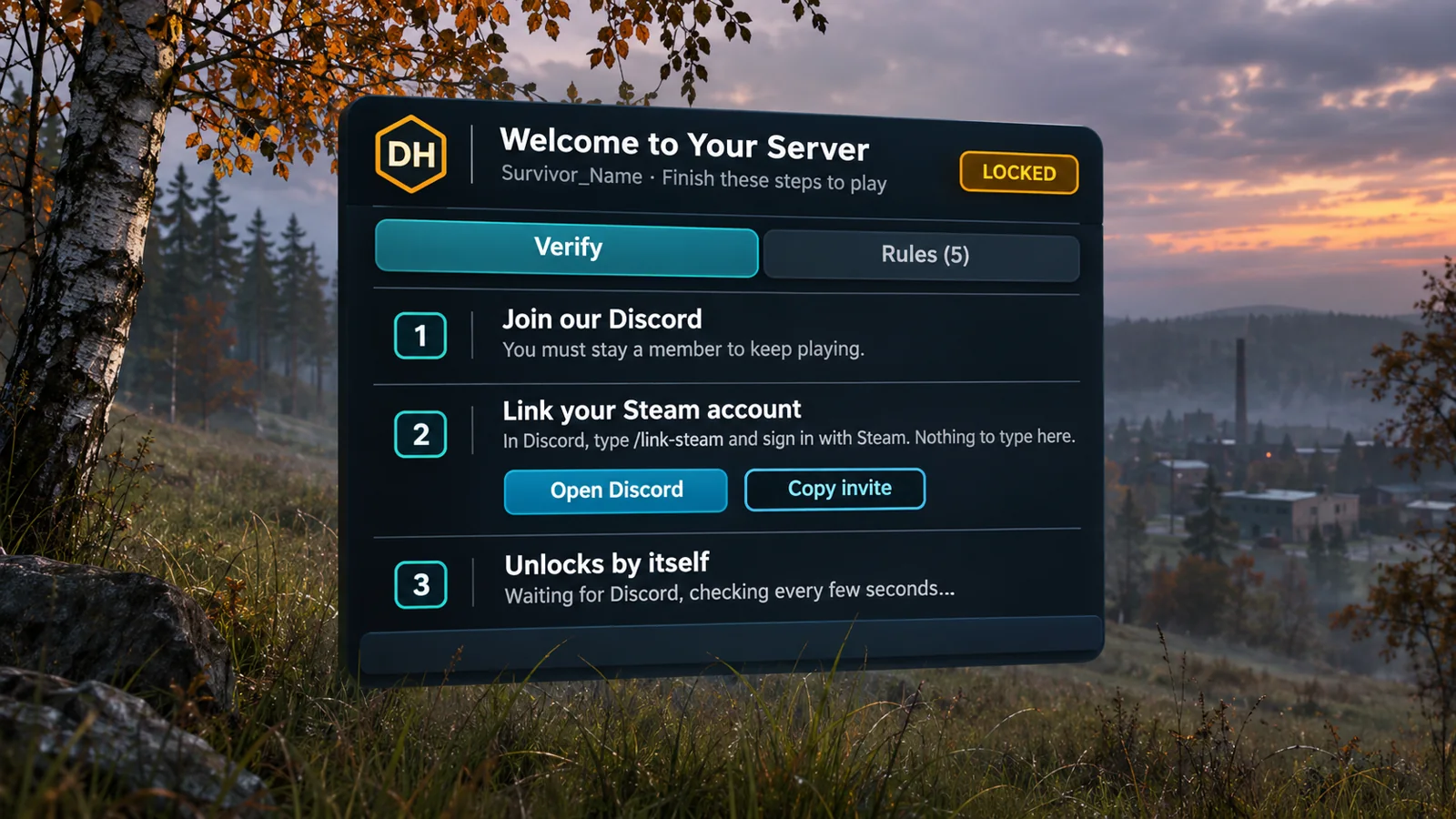
DayzHUB Authentication holds a new player until he has finished the steps you chose: accept your server rules, join your Discord and link his Steam account. Until then he is locked: he cannot move, shoot, use items or open his inventory, and he cannot hurt anyone or be hurt. The game server enforces it, so removing the mod on the client does not help. A menu opens by itself with the steps, and the player is unlocked the moment Discord confirms him.
Funziona con altre mod
Di cosa ha bisogno questa mod, con cosa è stata testata e cosa fa quando un'altra mod svolge lo stesso compito.
Richiede
- DayzHUB Core 1.0.8 or newer. Free with any DayzHUB mod. Download the current build from My mods.
- DayzHUB bot on your Discord server with a paid plan (Plan 1 or higher). Players link Steam with its /link-steam command.
- DayZ 1.30 The current build is made for it.
Funziona con
- DayzHUB Console Full control of Authentication from the Console, with locked, unlocked and kicked events in the log.
Funzionalità
Players
- A menu opens by itself with the steps: accept the server rules, join the Discord, link Steam with /link-steam (nothing is typed in the game).
- The player is unlocked by himself the moment Discord confirms him.
- Verified players are remembered (72 hours by default), so they are not held at every join.
Server owners
- Write your own rules in game with the rules editor (up to 30). Players accept them once, and again when you change them.
- A join delay so new players can look around first, an optional kick with a countdown, a staff bypass, a bypass list, and Let in and Kick for a held player.
- Already have a verified role from your own earlier verification? Pick it on the dashboard: a player is verified when he is linked and holds that role. Everybody links Steam once.
- If Discord or dayzhub.net cannot be reached, nobody is locked out.
- An admin bar page with Status, Settings, Rules and Players, and full control from the DayzHUB Console, with locked, unlocked and kicked events in the log.
- Nine languages plus Thai.
Requisiti e compatibilità
- DayZ 1.30 stable.
- Requires DayzHUB Core 1.0.8 or newer.
- Included with any paid DayzHUB bot plan (Plan 1 or higher; not during the free bot trial): one Discord server and unlimited game servers, nothing to buy. Log in at dayzhub.net with the Discord account that owns your server, then download it from My mods. If your plan has ended when the game server starts, the server stops after a clear message; if it ends while the server runs, only this mod pauses. If dayzhub.net cannot be reached, your server never stops.
- Client mod @DayzHUB_Authentication and server mod @DayzHUB_AuthenticationServer (server only, never give it to players).
Installazione
- Installa prima DayzHUB Core (gratis con ogni mod DayzHUB, download separato in My mods).
- Copia @DayzHUB_Authentication (client e server) e @DayzHUB_AuthenticationServer (solo server, mai ai giocatori) nella cartella del tuo server.
- Copia keys\DayzHUB.bikey da @DayzHUB_Authentication nella cartella keys del tuo server.
- Parametri di avvio: -mod=...;@DayzHUB_Core;@DayzHUB_Authentication e -servermod=@DayzHUB_AuthenticationServer
- Licenza: in My mods su dayzhub.net aggiungi l’IP e la porta di gioco del tuo server. Non c’è nulla da scaricare o da mettere sul server.
- Admin: aggiungi il tuo Steam64 id a <profiles>\DayzHUB\Admin\admins.json (Core crea il file al primo avvio).
Configurazione
- On dayzhub.net, open your server in the dashboard and choose Game Authentication: turn it on, create the server key (shown once), pick an existing verified role if you have one, and add your Discord invite link.
- Put the server key on one line in server_key.txt on every game server.
- In game, the admin bar page has Status, Settings, Rules and Players. Settings holds the join delay, the kick countdown and how long a verified player is remembered.
- The Players section shows who is waiting right now and the recent events, and lets you let a player in, kick him, or keep a Steam ID on a bypass list.
Supporto
Domande o un problema? Chiedi nel Discord di DayzHUB.
Guida utente (PDF)
Licenza server
Una licenza per mod e per server (IP pubblico e porta di gioco, IP:PORT). Aggiungi il server in My mods: non c'è nessun file di licenza da scaricare o installare. Ogni server in più costa un terzo del prezzo. Puoi prendere prima una versione di prova di 7 giorni (30% del prezzo) e fare l'upgrade più tardi pagando solo la differenza. Un server di prova gratuito (registrato con il suo nome esatto, con una password e fino a 10 slot) non conta. Se la licenza non è valida, il mod si mette in pausa da solo e il tuo server continua a funzionare; il log del server mostra un link per aggiungere il server. Se il nostro sito non è raggiungibile, i server già confermati continuano a funzionare fino a 12 ore.
📣 Registro aggiornamenti
Update2026-11-10
- Players are held on join until they accept your server rules and are verified through the DayzHUB Discord bot (member of your Discord, Steam linked once with /link-steam, optional verify role).
- The menu opens by itself with four steps and unlocks by itself the moment Discord confirms the player.
- A held player cannot move, shoot, use items, open the inventory, take damage or hurt anyone. The server enforces it.
- Server rules written in game with the rules editor (add, edit, move, remove; players accept again when the rules change).
- Join delay: new players can look around for a few seconds before the menu opens (0-600 seconds, default 0).
- Optional kick with a countdown in the menu (default off, 10 minutes).
- Verified players are remembered (default 72 hours) so they are not held at every join.
- Bypass list and staff bypass.
- If Discord or the site cannot be reached, nobody is locked out.
- Admin bar page: Status, Settings, Rules and Players. DayzHUB Console actions, events and webhooks.
- 9 languages plus Thai.